
Terminal Customisation
Info
This guide will walk you through customising your Bash prompt, how to run fastfetch on start in your terminal, and a few useful terminal programs.
Caution
This tutorial assumes that you are using Bash as your shell, even though some part of the tutorial may apply to non-Bash shells.
For non-Bash users, we cannot guarantee success and will not take responsibility to damages to your system.
Master quick append (Bash)
Paste into ~/.bashrc. Each option is explained in the sections below.
#### autorun fastfetch ####
fastfetch

#### custom PS1 prompt ####
PS1='------------------\n\[$(tput setaf 26)\][\[$(tput setaf 32)\]\u \[$(tput setaf 38)\]@ \[$(tput setaf 44)\]\h\[$(tput setaf 26)\]] \[$(tput setaf 75)\]\w\[$(tput sgr0)\]\n > '

#### quick config edit ####
alias edit-bash='$EDITOR ~/.bashrc' # edit this file with your default editor

#### fzf-related aliases ####
alias show-commands='compgen -c | fzf' # show all commands
alias search-history='history | fzf' # search in bash command history

#### enabling zoxide ####
eval "$(zoxide init bash)"

#### yazi: cd-on-exit wrapper ####
function y() {
	local tmp="$(mktemp -t "yazi-cwd.XXXXXX")" cwd
	command yazi "$@" --cwd-file="$tmp"
	IFS= read -r -d '' cwd < "$tmp"
	[ "$cwd" != "$PWD" ] && [ -d "$cwd" ] && builtin cd -- "$cwd"
	command rm -f -- "$tmp"
}
Master quick append (Fish)
Quick install:
sudo dnf install fishsudo apt install fishpacman -S fishThen set fish as your default shell (log out and back in for it to take effect):
chsh -s $(which fish)Fish loads functions on demand from ~/.config/fish/functions/.
mkdir -p ~/.config/fish/functionsIn ~/.config/fish/:
if status is-interactive
    #### disable welcome greeting ####
    set -g fish_greeting

    #### autorun fastfetch ####
    fastfetch

    #### quick config edit ####
    alias edit-fish='$EDITOR ~/.config/fish/config.fish' # edit this file with your default editor

    #### fzf-related aliases ####
    alias show-commands='complete -C "" | fzf' # show all commands
    alias search-history='history | fzf' # search in fish command history

    #### enabling zoxide ####
    zoxide init fish | source
end#### custom prompt ####
function fish_prompt
echo '------------------'
echo (set_color 005fd7)'['(set_color 0087d7)$USER(set_color 00afd7)' @ '(set_color 00d7d7)(hostname)(set_color 005fd7)'] '(set_color 5fafff)(prompt_pwd -d 0)(set_color normal)
echo -n ' > '
end#### yazi: cd-on-exit wrapper ####
function y
set tmp (mktemp -t "yazi-cwd.XXXXXX")
command yazi $argv --cwd-file="$tmp"
if read -z cwd < "$tmp"; and [ -n "$cwd" ]; and [ "$cwd" != "$PWD" ]
builtin cd -- "$cwd"
end
command rm -f -- "$tmp"
endBack up current .bashrc
Make a copy of your current .bashrc file and place it somewhere safe.
cp ~/.bashrc ~/.bashrc.bak # Makes a copy of current .bashrc file named .bashrc.bakMake sure that you have a .bashrc file in your /home/$USER/ at all times. If you followed the command above, you'd be fine.
You'll be editing the .bashrc file from your home directory in this guide, but if you ever want/need to revert back to the original file, simply replace the content in .bashrc from the backup you've made.
Here is an exemplar .bashrc file taken from my Fedora 42 Workstation (hopefully you don't have to use this):
# .bashrc

# Source global definitions
if [ -f /etc/bashrc ]; then
    . /etc/bashrc
fi

# User specific environment
if ! [[ "$PATH" =~ "$HOME/.local/bin:$HOME/bin:" ]]; then
    PATH="$HOME/.local/bin:$HOME/bin:$PATH"
fi
export PATH

# Uncomment the following line if you don't like systemctl's auto-paging feature:
# export SYSTEMD_PAGER=

# User specific aliases and functions
if [ -d ~/.bashrc.d ]; then
    for rc in ~/.bashrc.d/*; do
        if [ -f "$rc" ]; then
            . "$rc"
        fi
    done
fi
unset rc
Aesthetic Changes
Quick append
Your .bashrc should look something like this if you decide to follow all instructions in the following section:
# ... omitted original .bashrc content above

fastfetch

PS1='------------------\n\[$(tput setaf 26)\][\[$(tput setaf 32)\]\u \[$(tput setaf 38)\]@ \[$(tput setaf 44)\]\h\[$(tput setaf 26)\]] \[$(tput setaf 75)\]\w\[$(tput sgr0)\]\n > '
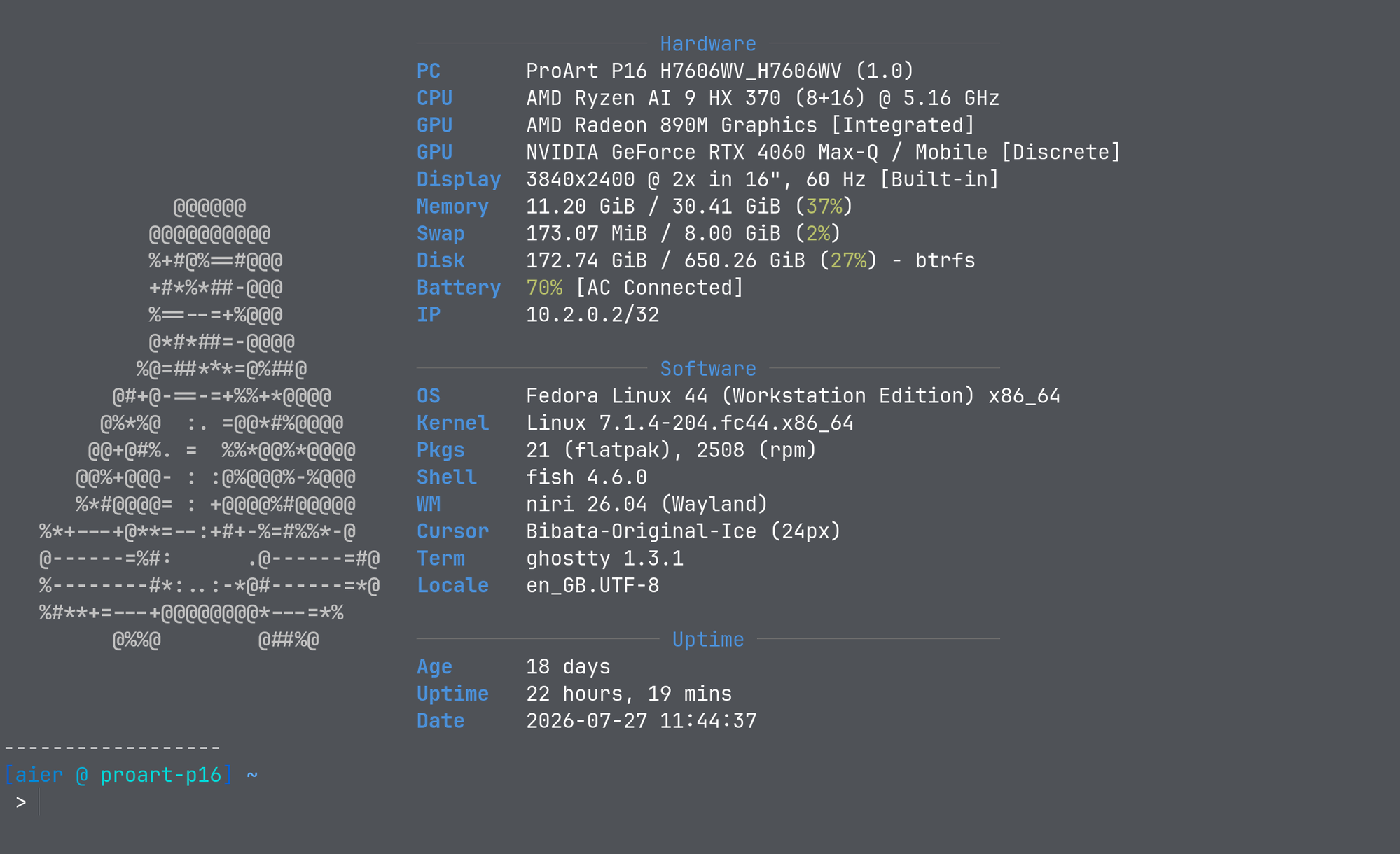
Autorun fastfetch when you open the terminal
You can make your bash terminal autorun fastfetch to display system information every time it starts by appending the following at the bottom of your file.
Installation
Fedorasudo dnf install fastfetchDebian/Ubuntusudo apt install fastfetchArchpacman -S fastfetchSet up
fastfetchin shellYou can append the following at the bottom of your
.bashrc:.bashrcfastfetchApply the Tuxie's Wiki config (optional)
For a Tuxie's Wiki-branded fastfetch — the Tux mascot in monochrome with steel-blue accents — download this
config.jsonc, extract it, and save it to~/.config/fastfetch/config.jsonc. fastfetch picks it up automatically.Changing the look of the prompt (
PS1)Now, in your
.bashrc, you change the looks of your prompt looks through modifying thePS1variable.You can append the following at the bottom of your
.bashrc:.bashrcPS1='------------------\n\[$(tput setaf 26)\][\[$(tput setaf 32)\]\u \[$(tput setaf 38)\]@ \[$(tput setaf 44)\]\h\[$(tput setaf 26)\]] \[$(tput setaf 75)\]\w\[$(tput sgr0)\]\n > 'More resources
Terminal programs
Quick append
Your .bashrc should look something like this if you decide to follow all instructions in the following section:
# ... omitted original .bashrc content above

#### fzf-related aliases ####
alias show-commands='compgen -c | fzf' # show all commands
alias search-history='history | fzf' # search in bash command history

#### enabling zoxide ####
eval "$(zoxide init bash)"

#### yazi: cd-on-exit wrapper ####
function y() {
	local tmp="$(mktemp -t "yazi-cwd.XXXXXX")" cwd
	command yazi "$@" --cwd-file="$tmp"
	IFS= read -r -d '' cwd < "$tmp"
	[ "$cwd" != "$PWD" ] && [ -d "$cwd" ] && builtin cd -- "$cwd"
	command rm -f -- "$tmp"
}
Using fzf (Fuzzy Find)
What is fzf?
fzf is a command-line fuzzy finder that helps you quickly search and navigate files, directories, command history, and more.
Installation
Fedorasudo dnf install fzfDebian/Ubuntusudo apt install fzfArchpacman -S fzfAdd aliases
Below are example aliases:
.bashrcalias show-commands='compgen -c | fzf' # show all commands alias search-history='history | fzf' # search in bash command historyMore resources
- Tutorial on how to use
fzfby DevOps Toolbox - Use
fzfwithzoxideby Dreams of Autonomy - More info about
fzffrom the officialfzfGitHub page.
- Tutorial on how to use
Using zoxide
What is zoxide?
zoxide is a terminal program that is like cd on steroids. It provides cd's functionality with the addition of being able to jump to directories with short, fuzzy-matched commands.
Installation
Fedorasudo dnf install zoxideDebian/Ubuntusudo apt install zoxideArchpacman -S zoxideSet up
zoxidein your Bash shellAppend the following to your
.bashrc:.bashrceval "$(zoxide init bash)"More resources
Using yazi
What is yazi?
yazi is a fast terminal file manager with image previews, fuzzy navigation, and plugin support.
Installation
Fedorasudo dnf copr enable lihaohong/yazi sudo dnf install yaziDebian/Ubuntuyaziis not in the stableaptrepositories — install it via the Rust toolchain:cargo install --locked yazi-fm yazi-cliArchpacman -S yaziAdd the
yshell wrapperThe
yfunction launchesyaziand changes your shell to its last directory on exit. Append it to your.bashrc:.bashrcfunction y() { local tmp="$(mktemp -t "yazi-cwd.XXXXXX")" cwd command yazi "$@" --cwd-file="$tmp" IFS= read -r -d '' cwd < "$tmp" [ "$cwd" != "$PWD" ] && [ -d "$cwd" ] && builtin cd -- "$cwd" command rm -f -- "$tmp" }Reload with
source ~/.bashrc, then runyinstead ofyazi.More resources
- See our Yazi guide for keys, optional dependencies, and image-preview setup
yazidocumentation
Contributors


Changelog
67132-on5b849-onc72d1-onec185-on23d7d-oneb0c5-on19622-on53daa-on87203-on5a130-onbdc42-on1ae6c-on9e015-on00c9a-on41235-on7c162-on2348f-onf5812-on35118-on54c8f-on9c34e-on5810a-on26c5a-on18d2a-on6f292-onb8933-on9537b-one2f6b-on0e8c8-one746c-ondaeb8-onc31f9-on686d1-on357ef-on0e14f-ond8be1-on7d0cb-on6cd30-on62c4b-on731c5-on0ed49-on99d1e-on41f78-on25920-on64610-ond95ee-ona154c-onddcec-on63f60-onfb788-onac353-on85907-on718fb-on