
Fedora Guide
Why Fedora?
Fedora offers a high-quality out-of-the-box experience while remaining highly flexible. It is stable, yet it has up-to-date and cutting edge packages.
Installation
Install Fedora onto your machine
TODO: A video step-by-step installation.
Installing Fedora in the Simplest Possible Way by Abhishek Prakash from It's FOSS.
NVIDIA GPU Driver Installation by the Fedora Docs.
Fedora on MacBook by Official Asahi Linux.
Update system
Terminalsudo dnf update -yGUI (Gnome Software)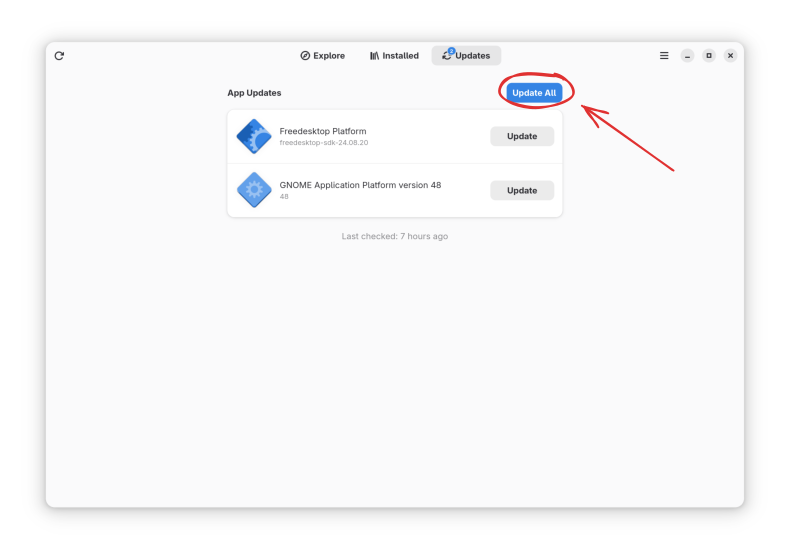
Update your firmware
Firmware updates can fix real bugs (battery life, sleep problems, dodgy webcams).
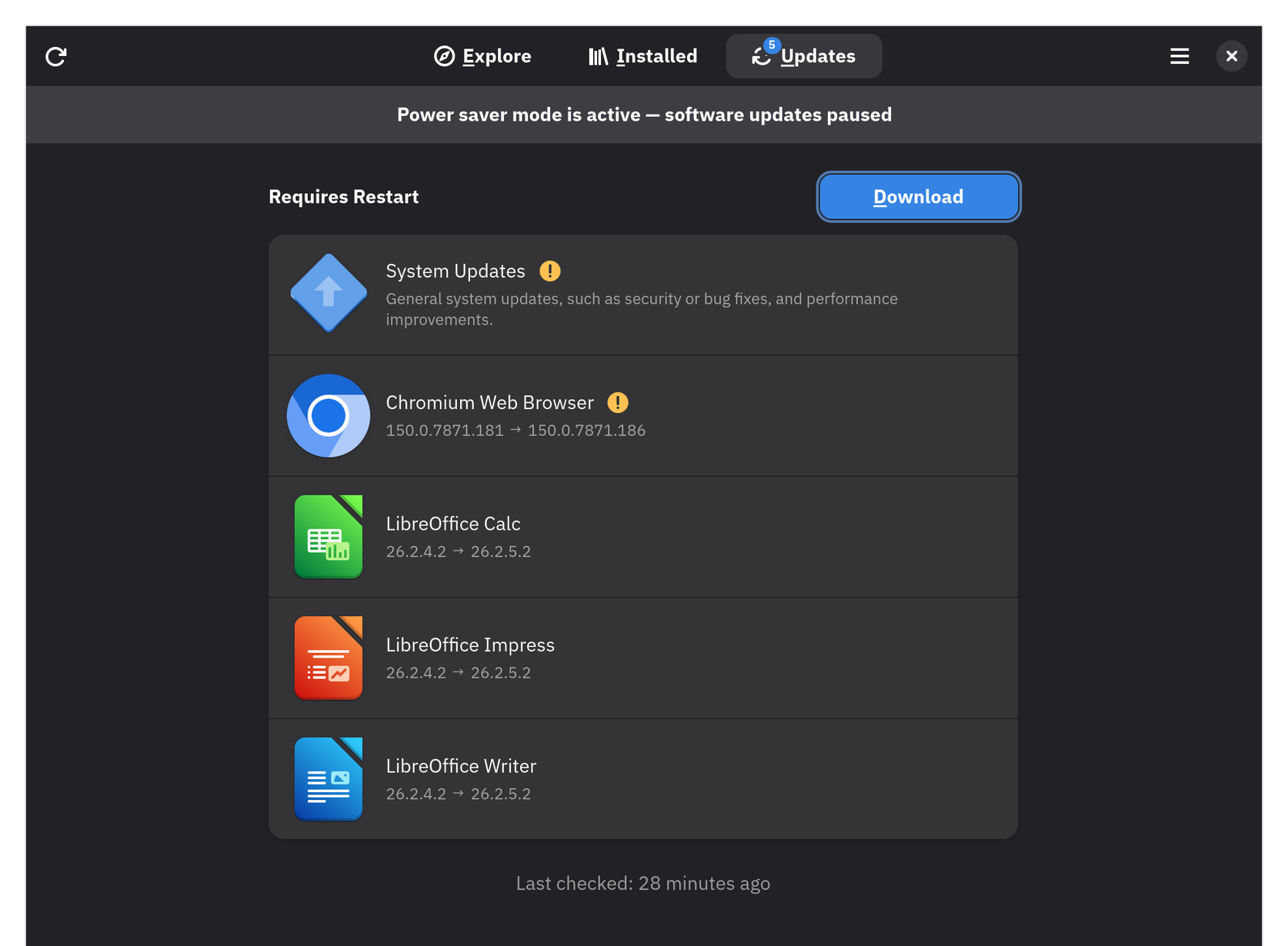
Terminalfwupdmgr refresh --force fwupdmgr get-updates fwupdmgr updateGUI (Gnome Software)Firmware updates show up next to your normal updates in the Updates tab.
Reboot
reboot
Other Repositories
Fedora leaves out a fair amount of software for legal, licensing, and philosophical reasons. You may consider the repositories below.
RPM Fusion
RPM Fusion carries video and audio formats, NVIDIA drivers, and plenty more. Most readers will want this one.
sudo dnf install \
  https://mirrors.rpmfusion.org/free/fedora/rpmfusion-free-release-$(rpm -E %fedora).noarch.rpm \
  https://mirrors.rpmfusion.org/nonfree/fedora/rpmfusion-nonfree-release-$(rpm -E %fedora).noarch.rpm
Gnome Software's Third Party Repositories toggle is not the same thing. It only adds a couple of narrow slices of RPM Fusion, such as the NVIDIA driver and Steam.
Terra
Terra is a community package repository for Fedora by Fyra Labs. 2000+ propietary/nonfree packages that Fedora doesn't ship by default can be found in Terra.
sudo dnf install --nogpgcheck --repofrompath 'terra,https://repos.fyralabs.com/terra$releasever' terra-releaseOnce enabled, you can install its packages with the regular dnf command.
Flathub (Flatpaks)
Many Linux apps are distributed as Flatpaks, a universal package format that works on every distro.
Set up the largest Flatpak repository here: Flatpak Setup.
Multimedia Codecs
Fedora ships without several common video and audio formats, so some videos refuse to play and some files won't open. Pull these from RPM Fusion:
Install codecs
Enable RPM Fusion first, or these commands will have nothing to fetch.
sudo dnf swap ffmpeg-free ffmpeg --allowerasing
sudo dnf group upgrade multimedia
sudo dnf group upgrade core
Reboot once it finishes
reboot
Hardware video acceleration
Fedora's stock drivers cannot process two common video formats (H.264 and HEVC) on your graphics chip. To avoid draining your battery and stutter on high-resolution video:
Install drivers
AMDsudo dnf install mesa-va-drivers-freeworldIntelsudo dnf install intel-media-driverNVIDIAsudo dnf install libva-nvidia-driverReboot
reboot
Create snapshots/backups for your computer
We'll be using btrfs-assistant, a simple GUI for managing snapshots. It sits on top of snapper and uses Fedora's default BTRFS filesystem, so snapshots are quick and preserve SELinux labels — no permissive mode and no relabeling needed.
Prefer the terminal?
Every step below is also available through the snapper CLI if you'd rather not use the GUI.
Install
btrfs-assistantsudo dnf install btrfs-assistant snapper python3-dnf-plugin-snapperSet up snapshots
Open
btrfs-assistantand go to the Snapper Settings tab. Click New, set Backup path to/, give it a Config name, then click Save.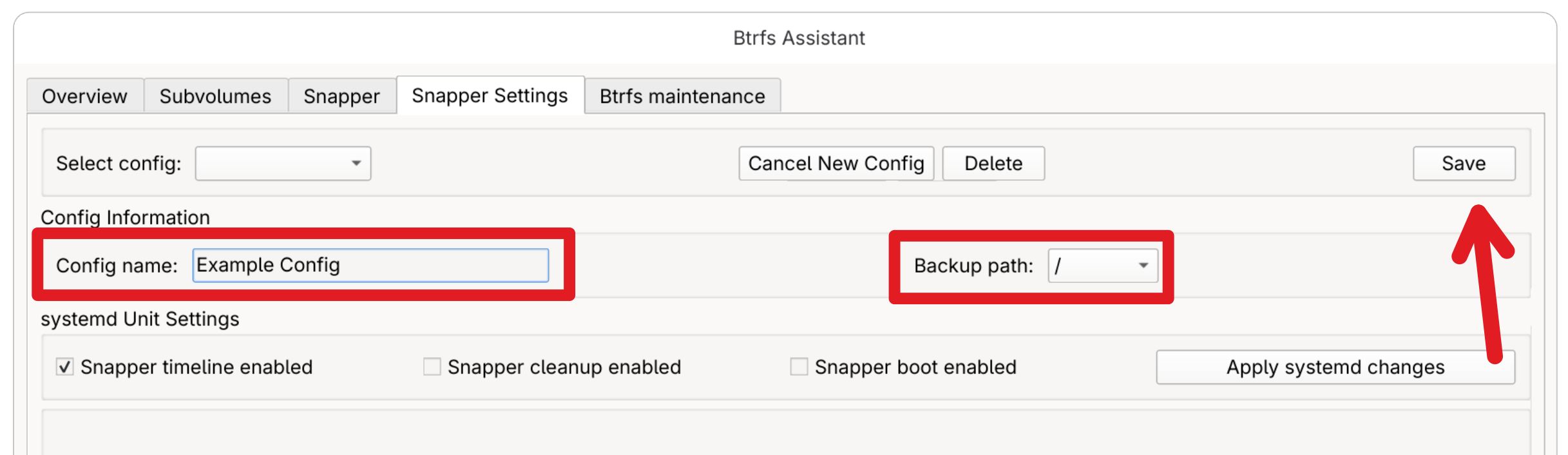
With the config selected, tick Enable timeline snapshots and choose how many to keep under Snapshot Retention.
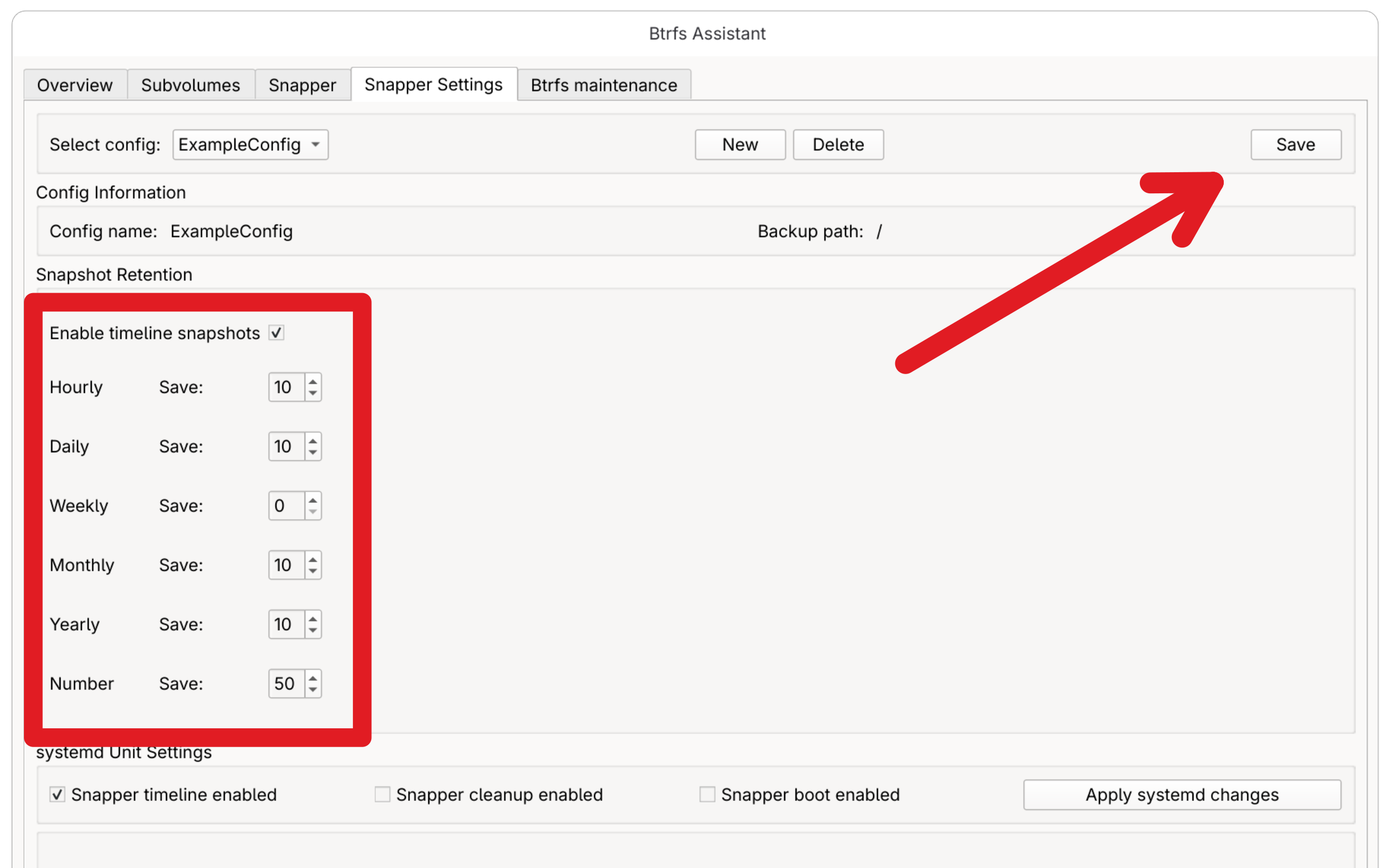
Then, under systemd Unit Settings, tick Snapper timeline enabled and Snapper cleanup enabled and click Apply systemd changes.
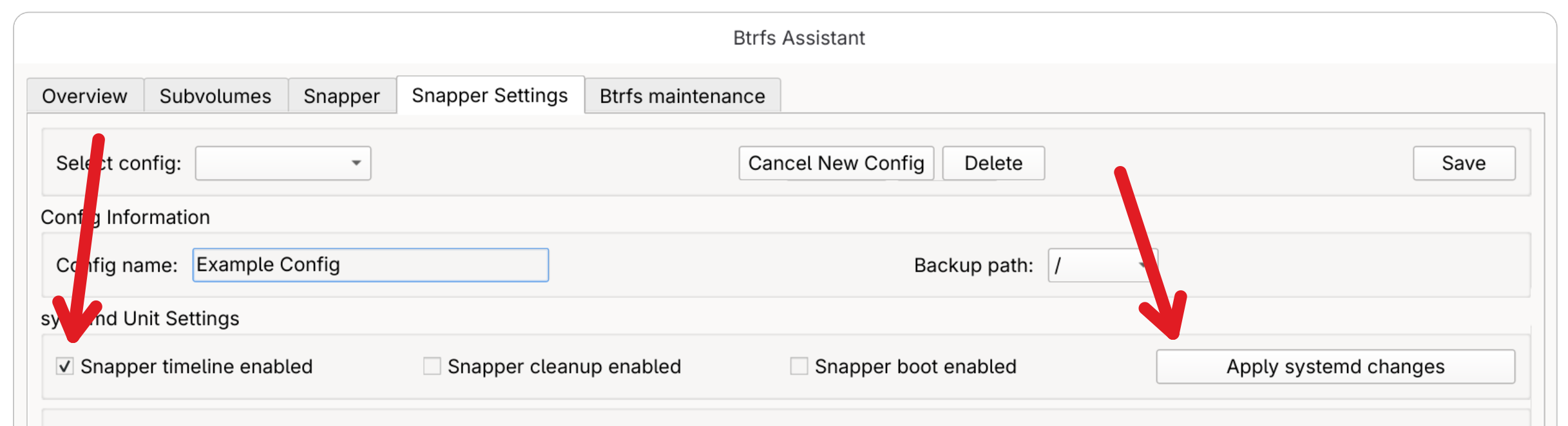
What these three
systemdoptions doThese
systemdtimers automate your snapshots.Snapper timeline runs per the schedule you set, giving you a steady stream of recent restore points with no effort.
Snapper cleanup runs periodically and deletes old snapshots so they never fill the disk using the limits you set.
Snapper boot takes a snapshot every time you turn your computer on. We leave this one off — your timeline snapshots already cover you; this would fill your snapshot limit much faster.
Take your first snapshot
Switch to the Snapper tab, select your config, and click New to take a manual snapshot. Give it a description like
clean install.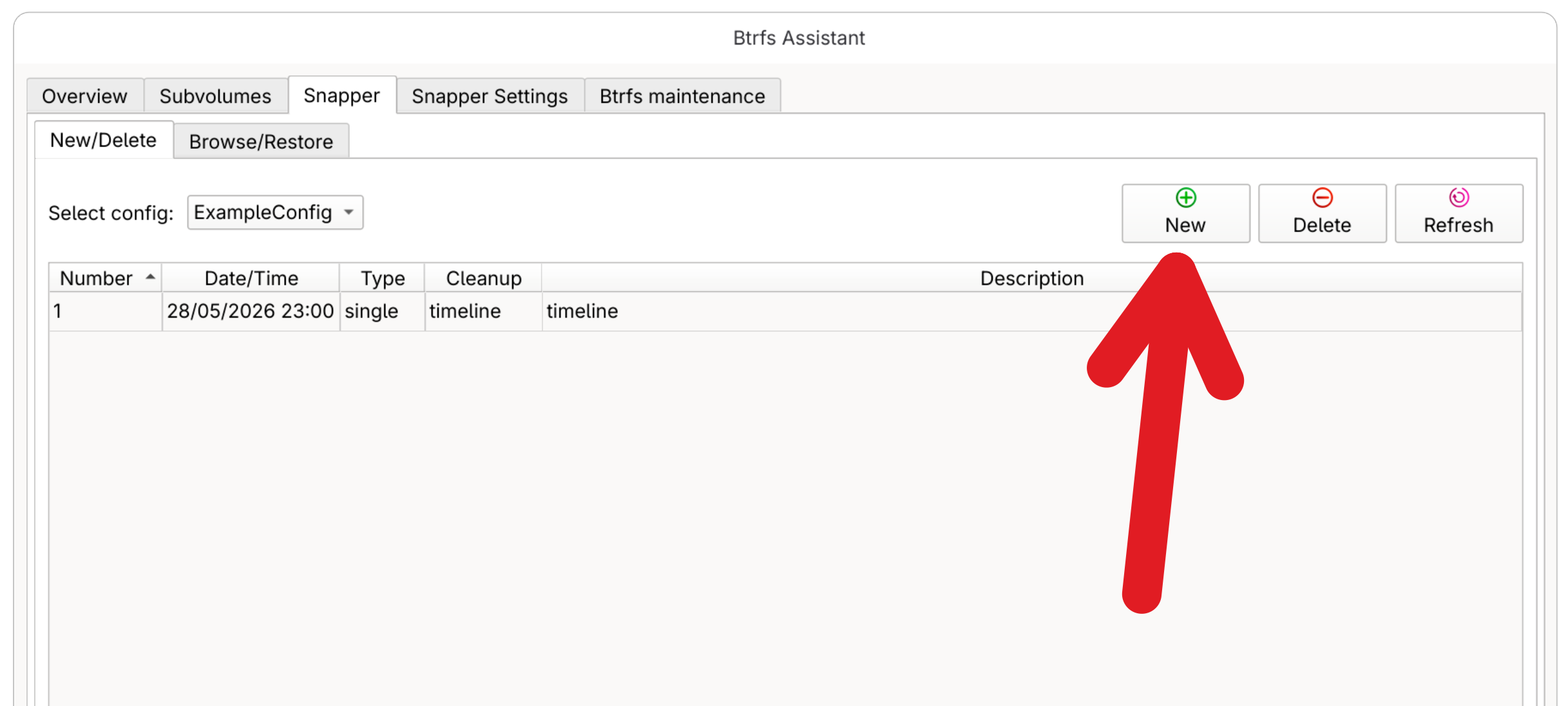
Restore a snapshot when needed
On the Snapper tab, open the Browse/Restore view, select the snapshot you want, and click Restore. Reboot once it completes.
Want to boot straight into a snapshot when your system won't start?
grub-btrfsadds a snapshots submenu toGRUBfor exactly that. It has no Fedora package and must be built from source, so follow its README if you'd like to set it up.
Contributors


Changelog
2d555-on3c19f-onb1397-on86748-onac6e7-on53daa-on51008-ona436a-ondbb96-on56e54-on00c9a-on41235-onf5812-on35118-onea68b-on5810a-ona7215-on15837-on6f292-ond4a77-one2f6b-onc31f9-on9c0ab-on9d94b-ondbe78-onf9fed-on6160a-one5a30-on8ddf1-on79fad-on945f3-on7e493-onb2539-on41f78-on362e5-onddcec-on20414-onfb788-on